Cooldown Module
Overview
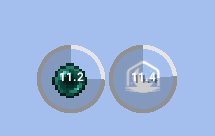
Apollo's cooldown module allows servers to interact with the Cooldown mod found within Lunar Client.
- Create your own cooldowns for the Lunar Client cooldown mod.
- Add your own custom icon, visible within the cooldown.
- Set your own duration for each cooldown.
Integration
Sample Code
Explore each integration by cycling through each tab, to find the best fit for your requirements and needs.
Displaying a Cooldown with an item
public void displayCooldownItemExample(Player viewer) {
    Optional<ApolloPlayer> apolloPlayerOpt = Apollo.getPlayerManager().getPlayer(viewer.getUniqueId());

    apolloPlayerOpt.ifPresent(apolloPlayer -> {
        this.cooldownModule.displayCooldown(apolloPlayer, Cooldown.builder()
            .name("enderpearl-cooldown")
            .duration(Duration.ofSeconds(15))
            .icon(ItemStackIcon.builder()
                .itemName("ENDER_PEARL")
                .build()
            )
            .build()
        );
    });
}
Displaying a Cooldown with a custom style
public void displayCooldownWithStyleExample(Player viewer) {
    Optional<ApolloPlayer> apolloPlayerOpt = Apollo.getPlayerManager().getPlayer(viewer.getUniqueId());

    apolloPlayerOpt.ifPresent(apolloPlayer -> {
        this.cooldownModule.displayCooldown(apolloPlayer, Cooldown.builder()
            .name("book-cooldown")
            .duration(Duration.ofSeconds(30))
            .icon(ItemStackIcon.builder()
                .itemName("BOOK")
                .build())
            .style(CooldownStyle.builder()
                .circleStartColor(ApolloColors.RED)
                .circleEndColor(ApolloColors.GREEN)
                .circleEdgeColor(ApolloColors.DARK_GRAY)
                .textColor(ApolloColors.LIGHT_PURPLE)
                .build())
            .build()
        );
    });
}
Displaying a Cooldown with a resource
public void displayCooldownResourceExample(Player viewer) {
    Optional<ApolloPlayer> apolloPlayerOpt = Apollo.getPlayerManager().getPlayer(viewer.getUniqueId());

    apolloPlayerOpt.ifPresent(apolloPlayer -> {
        this.cooldownModule.displayCooldown(apolloPlayer, Cooldown.builder()
            .name("lunar-cooldown")
            .duration(Duration.ofSeconds(15))
            .icon(SimpleResourceLocationIcon.builder()
                .resourceLocation("lunar:logo/logo-64x64.png")
                .size(24)
                .build()
            )
            .build()
        );
    });
}
Removing a Cooldown
public void removeCooldownExample(Player viewer) {
    Optional<ApolloPlayer> apolloPlayerOpt = Apollo.getPlayerManager().getPlayer(viewer.getUniqueId());

    apolloPlayerOpt.ifPresent(apolloPlayer -> {
        this.cooldownModule.removeCooldown(apolloPlayer, "enderpearl-cooldown");
        this.cooldownModule.removeCooldown(apolloPlayer, "book-cooldown");
        this.cooldownModule.removeCooldown(apolloPlayer, "lunar-cooldown");
    });
}
Resetting all Cooldowns
public void resetCooldownsExample(Player viewer) {
    Optional<ApolloPlayer> apolloPlayerOpt = Apollo.getPlayerManager().getPlayer(viewer.getUniqueId());
    apolloPlayerOpt.ifPresent(this.cooldownModule::resetCooldowns);
}
Cooldown Options
.name(String) should include a unique identifier for the each cooldown.
.name("enderpearl-cooldown").duration(java.time.Duration) the duration the cooldown should last for. See the java.time.Duration Javadocs (opens in a new tab) for more.
.duration(Duration.ofSeconds(15)).icon(itemStackIcon) is how you display a custom item icon. Read the icons utilities page to learn more about icons.
.icon(ItemStackIcon.builder().itemId("ENDER_PEARL").build()).icon(SimpleResourceLocationIcon) is how you display a custom texture icon. Read the icons utilities page to learn more about icons.
.icon(SimpleResourceLocationIcon.builder().resourceLocation("lunar:logo/logo-64x64.png").size(24).build()).style(CooldownStyle) is how you customize the visual appearance of the cooldown circle and text. See the CooldownStyle section below for more.
.style(CooldownStyle.builder()
    .circleStartColor(ApolloColors.RED)
    .circleEndColor(ApolloColors.GREEN)
    .circleEdgeColor(ApolloColors.DARK_GRAY)
    .textColor(ApolloColors.LIGHT_PURPLE)
    .build())
CooldownStyle Options
.circleStartColor(java.awt.Color) is the color displayed at the start of the cooldown circle animation. See the colors page for more.
.circleStartColor(ApolloColors.RED).circleEndColor(java.awt.Color) is the color displayed at the end of the cooldown circle animation. See the colors page for more.
.circleEndColor(ApolloColors.GREEN).circleEdgeColor(java.awt.Color) is the color of the circle's edge/border. See the colors page for more.
.circleEdgeColor(ApolloColors.DARK_GRAY).textColor(java.awt.Color) is the color of the cooldown timer text rendered in the center of the circle. See the colors page for more.
.textColor(ApolloColors.LIGHT_PURPLE)All CooldownStyle fields are optional; any field left unset will fall back to the client's default value.